NeoFiler
Multi-functional text editor, paint / handwriting memo, browser(Local files can be viewed), memo, etc.
are built!Be useful in various situations in addition to file management!
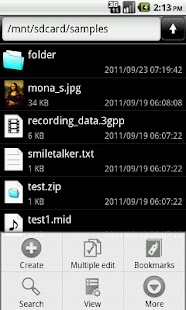
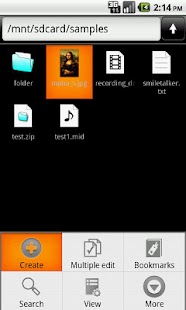
== Functions ==* View a list of files/folders.
(List / Grid view, Incremental search)* The editing of the file and the folder.
(Copy, Move, Rename, Delete etc.)* Sort out items.
(name order, last update order, size order)* The compression of the file and the folder.
(Zip file format)* The extracting of the compressed file.(ZIP, JAR, GZ, TGZ, TAR, BZ2, TBZ2)* The email attachment of the file.* The search of the file / folder.* Bookmark function (moved folder and file browsing more efficient)* Decrypt / encrypt the file (AES 256bit)* The MIME-Type management.
(Include MIME-Type database)* The viewing of various files.
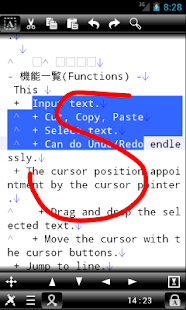
(Can use outside applications)* The editing of the text file.
(built-in Multi-function text editor)* The viewing of HTML file.
(It is equipped with Web browser)* The task management of the system.
(Built-in the task management application)* The voice memo.* Handwritten memo, Paint function.* Shortcut function.
(Create & Launch)* Saving or opening the attached file of the email.* It is called by outside application and opens a file.
== More infomation ==http://skyarts.com/products/android/neofiler/
== Use example ==Can use it as as a compound memo or the out-line processor which used a folder hierarchy by using text editor, the handwriting memo, the voice memo function!Compress a file after editing and attach it to an email and can transmit a message because compress an files and an folders and can make a Zip file.
Each file extension connects it with an MIME type and can manage it.
Therefore you can use it as a launcher of the outside application in conjunction with the MIME type.ex.: Open an HTML files by the browser.
Open an pictures file by the image viewer.
Open an sound files by the music player application.
etc.
Can open a folder immediately if you use the shortcut of the folder!Can open a file immediately if you use the shortcut of the file and can perform editing!The icon of the shortcut can use the favorite image!
Can terminate the tasks that use memory with running in an invisible place of the rear by the task management capability of the system.
== Basic operation ==The basic operation has it in "pushing it down a Menu key" "the tap of the item", "the push and hold of the item".Menus are displayed by operating each.Please refer to a help or a product page for the detailed operation method.
== Made in Japan ==High quality made in Japan!
== About the license certification ==For illegal copy prevention, work connect to the server at the time of first start and license it, and to authenticate it.The following things are thought about when error "999" appears at the time of the license certification.
* Because communication facility becomes invalid, certification processing is not possible.
-> Please validate communication facility.
It is OK in WiFi.
* Because "market" application gives an error, certification processing is not possible.
-> May be recovered when you uninstall update of the (Android) "Market" application.
-> When the password of "Accounts & sync" of the setting window is not input or disappear, it occurs.When you hold "Accounts & sync" of the setting window, and it is demanded password input, it is thought that it is caused by this.
About NeoFiler
- Package name (App ID)
- com.skyarts.android.neofiler
- Available on
- Google Play
- Price
- Free
- Version
- v5.4.4
Looking for the NeoFiler APK?
The safest way to get NeoFiler (com.skyarts.android.neofiler) on your Android device is to install it directly from Google Play — you'll always get the latest official version, automatic updates, and no risk of modified or infected APK files from third-party sites.
Music Features
Enjoy high-quality music streaming and playback features.
Social Features
Connect and share with friends and the community.
Gaming Features
Enjoy immersive gaming experience with various game modes.
See NeoFiler in Action
Frequently Asked Questions
Is NeoFiler free?
Yes, NeoFiler is free to download and install on Android through Google Play.
How do I install NeoFiler on Android?
Open Google Play on your Android phone or tablet, search for NeoFiler or tap the Google Play button on this page, then tap Install. The app downloads and installs automatically.
What is com.skyarts.android.neofiler?
com.skyarts.android.neofiler is the App ID (package name) of NeoFiler on Google Play. Every Android app has a unique package name, and it is the safest way to verify you are installing the official app.
Is NeoFiler safe to download?
Installing NeoFiler from Google Play is the safest option: you get the official version, verified by Google Play Protect, with automatic updates. Avoid APK files from unofficial third-party sites.
Get NeoFiler Today
NeoFiler for Android — free download on Google Play.
Compatible with Android phones and tablets — available on Google Play.
Ask AI about this app
Get instant answers about features, tips and more from popular AI assistants.